

How to register my Java cell phone App with my transaction number?
Besides the subscription the buy-version doesn't need an internet connection urgently. But if you have one the register process is much easier:
Open the about dialogue (Menu ->Navigation ->About), then 'Menu ->Register':
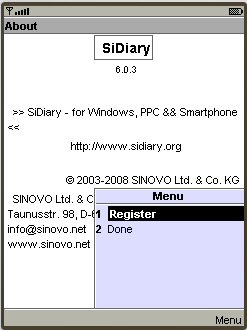
Choose the option 'I have purchase a full license' and press again on 'Menu ->Register':
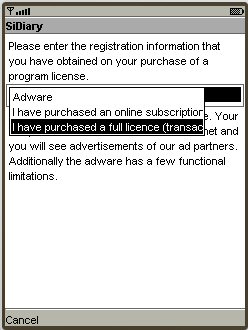
If you have purchased a SiDiary USB stick, you can find the transaction number by starting SiDiary on the stick and then switch into the menu 'Help -> Register'.
Enter your transaction number (starting with the letter 'M') and press on 'Menu ->Register' to finish the registration:
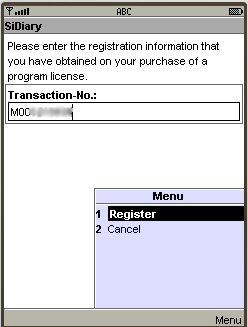
You will get a success message; the registration has been done on the cell phone:
And if I don't have an internet connection on my mobile device?
Even in this case SiDiary will try to establish an internet connection first and shows you after a few seconds the following message, on which you can press on 'OK':
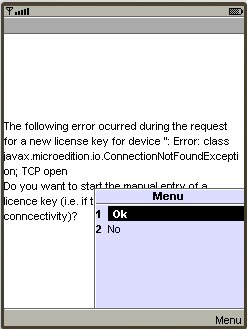
Next you will be prompted with the mask to enter manually:
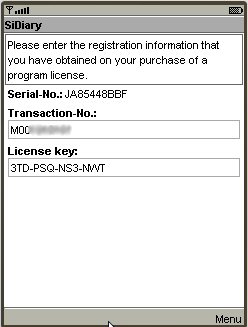
Please write down the serial number from there. If you can go an any other PC into the internet go to our homepage, then in the navigation on the left side click on 'Customer Service' and then on Registration.
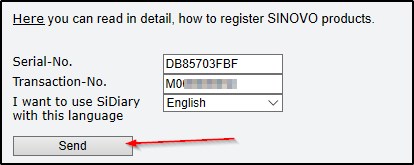
Here you can enter your serial number and your transaction number; you will get then the license key be email automatically.
If you don't have any internet connection you also can request for the license key by phone: +49 (0)6101/590 90 99
If you have any problems with it please don't hesitate to contact us at support.sidiary@sinovo.de. We will be glad to help you!
Java, Symbian, Smartphone, Handy, cell phone unlock, register, transaction number